


Wireless Reverse Charging
3.8224.00 Reviews
App Specs
- Version
- 13.0
- Updated On
- License
- Free
- Downloads
- 500,000+
- Developer
- Masivapp
- Categories
- Libraries & Demo
- Platform
- Android
Screenshots
 Analysis by AppCompare
Wireless reverse charging is the kind of feature that makes you go, "Wait, my phone can do this?" It's like finding out your smartphone has a hidden superpower. If you're anything like me, you're always on the lookout for ways your device can make life just a little bit easier or, at the very least, more interesting. So, let's dive into what makes this feature tick and why it might just be your new best friend.
What's Wireless Reverse Charging All About?
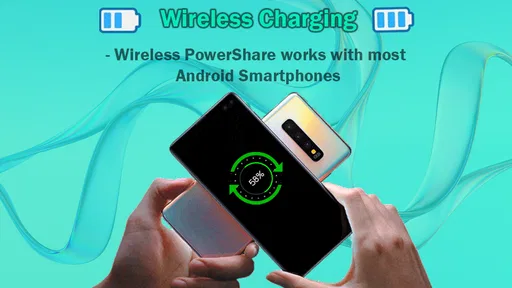
First up, let's break down what wireless reverse charging actually means. Imagine this: your phone isn't just a power-hungry slab of tech; it can also be a power source for your other devices. It's like turning your phone into a mini wireless charging pad. This feature allows your phone to share its juice with other compatible devices. So, whether it’s your wireless earbuds, a friend's phone running low, or even a smartwatch, you can top them up directly from your phone. Pretty neat, right?
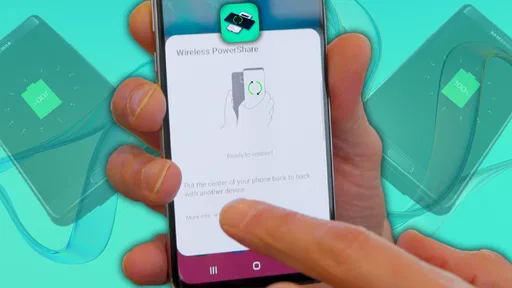
Now, you might be wondering how it works. It’s based on the Qi wireless charging standard, which is the same tech that lets you charge your phone on a wireless pad. The difference here is that your phone becomes that pad. All you have to do is enable the feature, place the device you want to charge on the back of your phone, and voilà! Power sharing magic.
Why It’s a Game Changer
Picture this scenario: you're out and about, and your friend's phone is dying. No charger in sight. Instead of watching them panic as their battery icon turns red, you whip out your phone and offer a little power boost. It's like being the hero of the day with just a tap. This feature is especially handy during travel or when you're out for long periods without access to your usual charging setups.
But it's not just about saving your buddies. Think about all those tiny gadgets we carry around these days. From smartwatches to wireless earbuds, they all need charging. And let's be honest, remembering to charge every single one of them is a hassle. With wireless reverse charging, you can keep your essentials powered up on the go without needing to carry extra cables or a separate power bank.
Using It Without a Hitch
Activating wireless reverse charging is usually a straightforward process. Depending on your phone model, you might need to dig into your settings to find it. Once activated, it's as simple as placing the other device on the back of your phone. Of course, there are some limitations. Not every device supports this feature, and it’s usually found in mid to high-end smartphones.
Plus, while it's a handy feature, keep in mind that it’s not the fastest way to charge another device. It’s more of an emergency fix than a long-term charging solution. Your phone's battery will drain as it gives power to another device, so it’s wise to use it sparingly if you need your phone to last the day.
Worth Reading Before You Choose

EA SPORTS FC Mobile 26 Is a Bigger Football Game, but It Takes Time

Flipboard Shows What News Apps Must Do Beyond the Feed

Switching to Android Auto Means Rethinking Your Driving Routine

Google Calendar Makes a Crowded Week Easier to Manage

Ludo King Makes the Most of the Minutes Between Plans

Baby Panda World Brings Quick Play to Modern Phones, but Its Game Library Feels Busy
Wrapping It Up
Overall, wireless reverse charging is a feature that adds a layer of convenience to our tech-filled lives. It's not going to replace your trusty wall charger anytime soon, but it's a fantastic option when you’re in a pinch. Whether you’re helping a friend out or just making sure your earbuds survive the commute home, it’s a handy trick to keep up your sleeve.
In a world where being connected is key, having a little extra power to share can make all the difference. So next time you’re exploring the settings on your phone, give wireless reverse charging a try. You never know when it might come in clutch!
Pros
- Convenient for charging on-the-go.
- Eliminates the need for extra cables.
- Supports a variety of devices.
- Energy efficient and eco-friendly.
- User-friendly interface.
Cons
- Limited to compatible devices only.
- Consumes phone battery quickly.
- Charging speed is relatively slow.
- May cause device overheating.
- Not available on all models.
FAQs for Wireless Reverse Charging
What is Wireless Reverse Charging and how does it work?
Wireless Reverse Charging is a feature that allows your device to charge other compatible devices wirelessly. It uses electromagnetic fields to transfer energy from your device's battery to another device. Simply enable the feature, place the devices back-to-back, and the charging process begins. It's convenient for charging accessories like earbuds or smartwatches on the go.
Which devices are compatible with Wireless Reverse Charging?
Compatibility depends on the specific devices you own. Generally, most modern smartphones with wireless charging capabilities can use reverse charging. However, it's essential to check your device's specifications and the manufacturer's guidelines to ensure compatibility with the devices you plan to charge.
Does using Wireless Reverse Charging affect my device’s battery life?
While using Wireless Reverse Charging can slightly increase battery usage, it shouldn’t significantly impact overall battery health if used occasionally. However, frequent use may lead to quicker battery depletion. It’s recommended to use this feature sparingly and ensure your device is sufficiently charged before using it to charge other devices.
How do I enable Wireless Reverse Charging on my device?
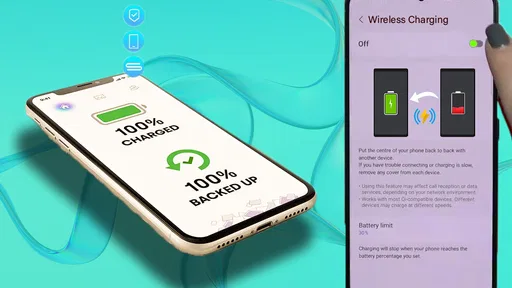
To enable Wireless Reverse Charging, go to your device's settings menu. Look for connectivity or power sharing options. Once found, activate the feature. Some devices might offer a quick toggle in the notification panel for faster access. Always ensure that the feature is supported by your device model.
Are there any limitations to using Wireless Reverse Charging?
Yes, there are a few limitations. The charging speed is usually slower compared to wired charging methods, and it might not be suitable for powering large devices like tablets. Additionally, both devices must be closely aligned for efficient charging, and obstructions such as cases may affect performance.


